Module 3: Retrieval-Augmented Generation (RAG) and Vector Embeddings
Hello again! Modules 1 and 2 taught us about LLMs and how fine-tuning specializes them. Now, imagine giving your LLM a "super brain" that remembers your code. That's RAG! It helps LLMs answer questions about specific things, like your projects. Let's learn it step by step with fun visuals.
I. Why We Need RAG
A. The Context Window Limit
LLMs have a "memory limit" called the context window. They can't read your whole codebase at once or know private details. Without RAG, LLMs might guess wrong or make up info.
B. What is RAG?
RAG stands for Retrieval-Augmented Generation. It helps with context window limits by pulling in relevant info from your data before generating answers.
How it works: Convert text to vector embeddings (numbers) using encoder models. Store in vector DBs like ChromaDB, Milvus, Weaviate, Pinecone, FAISS. Query by converting your question to vectors, find similar ones (cosine similarity), get top results to LLM.
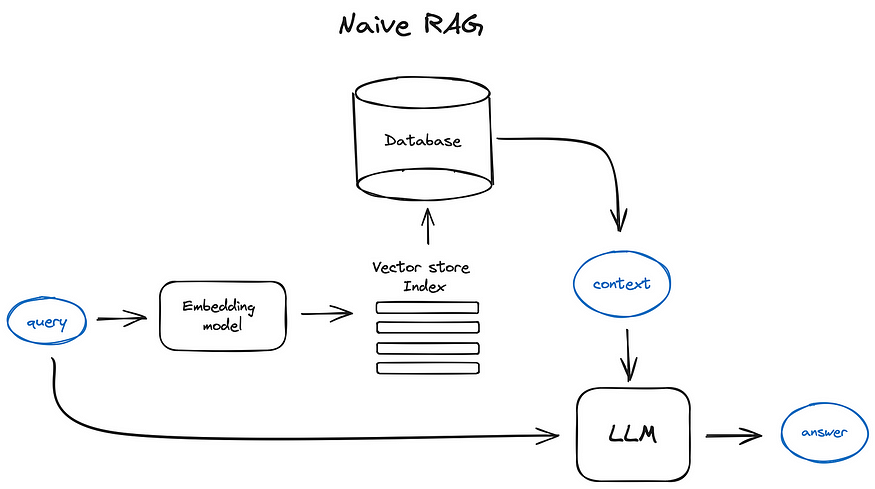 The basic ("naive") RAG flow: the query goes two places at once — through an embedding model to search the vector store index, and directly to the LLM alongside whatever context that search returns.
Why cool? RAG stops wrong answers and lets LLMs use real code facts.
ASCII Art:
Question: "What does function X do?"
Find: [Look in Code] -> [Get Function X]
Add: Question + Function X = Better Question
Answer: LLM says the truth!
Not just code! The same trick works for any text. Say you have a folder of legal contracts. Someone asks, "What's the termination notice period in the Acme vendor contract?" Instead of the LLM guessing from memory, RAG searches across all your contracts, finds the exact clause that answers the question, and hands just that clause to the LLM.
II. Vector Embeddings: The Magic Numbers
A. What Are Embeddings?
Embeddings are lists of numbers that "describe" text or code. Think of them as a code's "fingerprint." A special model (encoder) turns words into these numbers.
B. How They Help
Similar code gets similar numbers. Like neighbors in a city—close addresses mean similar places.
We check how close two fingerprints are using "cosine similarity." High score = very similar!
Vector Generation: Encoder models create these vectors.
Example:
Code 1: "def add(a, b): return a + b" -> Numbers: [0.1, 0.8, ...]
Code 2: "def sum(x, y): return x + y" -> Numbers: [0.1, 0.7, ...]
Close numbers = Similar code!
This works for legal text too — embeddings capture meaning, not exact words:
Clause A: "The Vendor may terminate this Agreement upon 30 days written notice." -> Numbers: [0.2, 0.6, ...]
Clause B: "Either party may end this Contract with a 30-day notice period." -> Numbers: [0.2, 0.55, ...]
Close numbers = Same meaning, even though the wording is completely different!
III. Storing Embeddings: Vector Databases
A. What They Do
Vector DBs are special storages for millions of fingerprints. They keep the numbers and link them to the original code.
They search super fast using smart math.
Querying: Convert query to vector, search DB for top-N similar (cosine similarity), return to LLM.
B. Popular Ones
Free and Local: - ChromaDB: Easy for beginners. - Milvus: For bigger projects. - FAISS: Quick searches in memory.
Online Services: - Pinecone: Simple and managed. - Weaviate: Good for organizing data.
IV. The RAG Process: Step by Step
A. Setup (Indexing)
- Load your source data — code files, legal documents (contracts, policies), PDFs, or any text.
- Break into small chunks (like sentences, functions, or contract clauses).
- Turn chunks into fingerprints (embeddings).
- Store in a Vector DB.
B. Answering Questions (Querying)
- Get user's question.
- Turn question into a fingerprint.
- Search DB for the closest fingerprints (top matches).
- Grab the real code from those matches.
- Add code to the question for LLM.
- LLM answers using the extra info.
V. Tools and Real Uses
A. Easy RAG Tools
- Haystack (haystack.deepset.ai): Build RAG systems with ready parts.
- LlamaIndex (llamaindex.ai): Connect LLMs to your data easily.
Simple Examples:
For ChromaDB (github.com/chroma-core/chroma):
import chromadb
client = chromadb.Client()
collection = client.create_collection("code_chunks")

# Add some code snippets with embeddings (assume embeddings are pre-computed)
documents = ["def add(a, b): return a + b", "def multiply(x, y): return x * y"]
ids = ["func1", "func2"]
embeddings = [[0.1, 0.2, ...], [0.3, 0.4, ...]]  # Example vectors

collection.add(
    documents=documents,
    embeddings=embeddings,
    ids=ids
)

# Query for similar code
query_embedding = [0.1, 0.2, ...]  # Vector for "add function"
results = collection.query(
    query_embeddings=[query_embedding],
    n_results=1
)
print(results['documents'])  # Gets the most similar code
The exact same code works for documents instead of code — here it is retrieving from a set of legal contracts:
import chromadb
client = chromadb.Client()
collection = client.create_collection("legal_clauses")

# Add clauses from a set of legal documents (two different contracts) with embeddings
documents = [
    "The Vendor may terminate this Agreement upon 30 days written notice.",
    "Either party may end this Contract with a 30-day notice period.",
    "This Agreement is governed by the laws of the State of Delaware.",
]
ids = ["contract_A_clause_12", "contract_B_clause_7", "contract_A_clause_20"]
embeddings = [[0.2, 0.6, ...], [0.2, 0.55, ...], [0.9, 0.1, ...]]  # Example vectors

collection.add(
    documents=documents,
    embeddings=embeddings,
    ids=ids
)

# Ask: "What's the notice period to terminate the contract?"
query_embedding = [0.2, 0.58, ...]  # Vector for the question
results = collection.query(
    query_embeddings=[query_embedding],
    n_results=2
)
print(results['documents'])  # Returns the two termination-notice clauses, not the governing-law one
For Haystack (haystack.deepset.ai):
from haystack import Pipeline
from haystack.components.builders import PromptBuilder
from haystack.components.generators import OpenAIGenerator

# Simple pipeline: Retrieve and generate
pipeline = Pipeline()
pipeline.add_component("retriever", InMemoryBM25Retriever(document_store=doc_store))
pipeline.add_component("prompt_builder", PromptBuilder(template="Answer: {{documents}} {{query}}"))
pipeline.add_component("generator", OpenAIGenerator())

pipeline.connect("retriever", "prompt_builder")
pipeline.connect("prompt_builder", "generator")

# Run query
result = pipeline.run({"retriever": {"query": "How does add work?"}})
For LlamaIndex (llamaindex.ai):
from llama_index import VectorStoreIndex, SimpleDirectoryReader

# Load documents from folder
documents = SimpleDirectoryReader("data").load_data()
index = VectorStoreIndex.from_documents(documents)

# Create query engine
query_engine = index.as_query_engine()

# Ask a question
response = query_engine.query("What is the add function?")
print(response)
For FAISS (github.com/facebookresearch/faiss):
import faiss
import numpy as np
# Create index
index = faiss.IndexFlatL2(128)  # 128-dim vectors
# Add vectors
vectors = np.random.random((100, 128)).astype('float32')
index.add(vectors)
# Search
query = np.random.random((1, 128)).astype('float32')
distances, indices = index.search(query, 5)
B. For Your Projects
- Tutorial Maker: Find code parts to explain.
- Chatbot: Get exact code for questions.
Usages and Use Cases: RAG is great for Q&A on codebases, legal documents and contracts, policies, or any large text collection. Libraries like Haystack and LlamaIndex have ready-to-use RAG with examples.
Mermaid Diagram: RAG in Action
See how RAG picks the best code chunk:
graph TD
    A[User Asks: How does add function work?] --> B[Turn Question into Numbers]
    B --> C[Search Database]
    C --> D["Chunk 1: def multiply... Match: 60%"]
    C --> E["Chunk 2: def add(a,b): return a+b Match: 90%"]
    C --> F["Chunk 3: def subtract... Match: 50%"]
    E --> G[Pick Best: Chunk 2]
    G --> H[Add to Prompt: Question + Chunk 2]
    H --> I[LLM Thinks and Answers]
The exact same flow works for legal documents: swap "code chunks" for "contract clauses," and the process is identical — convert the question to a vector, search across every contract you have, and hand the LLM only the matching clause instead of dumping every contract into its context.
VI. Why Not Just Fine-Tune the Model on These Documents Instead?
You might be wondering: we already learned about fine-tuning in Module 2 — so why not just fine-tune the model directly on our legal documents or our codebase, instead of bothering with embeddings and vector databases?
Here's why RAG usually wins for this kind of data:
- Some data changes constantly, or is live. Your codebase gets new commits every day. Legal documents get amended, new contracts get signed, policies get updated. Fine-tuning takes hours or days and costs real money — you can't realistically retrain the model every time a file changes.
- The LLM is already trained on billions of documents. During pre-training, the model already saw an enormous amount of text. If you fine-tune it on, say, a 100-page legal contract, that document gets mixed in among everything else the model has ever learned — it's easy for a fine-tuned model to misremember or blend details from your document with something else it saw during pre-training, because your 100 pages are a tiny drop in an ocean of parameters.
- RAG updates are cheap; fine-tuning updates are not. When your documents or codebase change, RAG only needs to re-embed and re-index the changed parts — a fast, cheap operation. Fine-tuning again means another expensive training run.
- RAG puts the answer directly in front of the model. With RAG, the exact relevant clause or function is placed directly into the LLM's context window for that specific question — the model doesn't have to recall it from among the billions of documents baked into its weights. It just reads it, right there in front of it, like an open book, instead of trying to remember something it half-learned during training.
In short: fine-tuning changes what the model knows (baked into its weights); RAG changes what the model sees (fed into its context, at the moment you ask). For fast-changing or huge document sets like codebases and legal archives, RAG is almost always the cheaper and more reliable choice.
Tutorial Progress
graph LR
    A[Module 1: LLMs] --> B[Module 2: Training]
    B --> C[Module 3: RAG]
    C --> D[Module 4: Tools]
    D --> E[Module 5: Memory]
    E --> F[Module 6: Agents]
    F --> G[Module 7: Multi-Agent]
    style A fill:#90EE90
    style B fill:#90EE90
style C fill:#FFFF00Summary
RAG boosts LLMs with your code and document knowledge. You now know embeddings, DBs, and the steps. Try ChromaDB for practice!
Quick Check: Name the 3 RAG steps. Why are embeddings useful? Why is updating RAG usually cheaper than fine-tuning?
Keep going! 🚀
Previous Module: Module 2: Training LLMs Next Module: Module 4: LLM Tool Calling